
Robotic Arm Manufacturer,Supplier and Exporter in India
Product Code : EL-CTM-9060
Jlab Export is a leading Robotic Arm Manufacturer,and suppliers in India
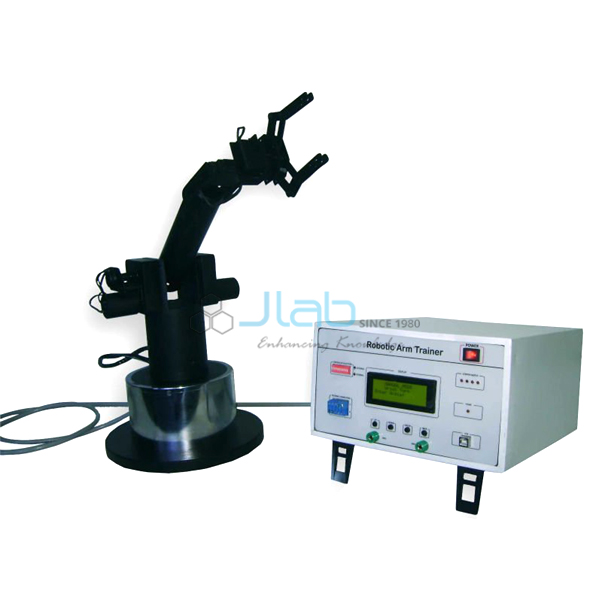
Built as a teaching model of an industrial robot, this robotic arm has five joints that act like a shoulder, an elbow and a wrist. It can be driven from its own control panel or from a computer. Students write a task in the software editor, compile it and download it straight into the arm’s processor.
Specifications
| Joints | Five, like a shoulder, elbow and wrist |
| Joint drives | Servos, each set by start angle, stop angle and speed |
| Control | Control panel or computer software |
| Control panel | LCD, switches, home sensor LED, external interface connector with DIP switches, USB |
| Software | Moves each joint by mouse or keyboard, programming editor that compiles and downloads tasks |
| Processors supported | From 8-bit microcontrollers to larger processors |
| Interfaces | USB data acquisition, optional PLC interfacing |
| Homing | Automatic return to the home position |
| Power switch | Touch-operated ON/OFF |
| Supplied with | Course material, references and demo programs |
| Minimum order quantity | 1 unit |
| Dispatch time | Usually 14–18 working days |
| Manufacturer | JLab (Jain Laboratory Instruments Pvt Ltd), Ambala, India |
Robotics Lab Exercises
A first session moves one joint at a time from the control panel or with the mouse. Students see how each servo angle changes where the end of the arm goes. They then write a task in the editor that steps the arm through a series of positions and returns it to home. Changing the speed values shows how cycle time and smooth motion trade against each other.
The arm also supports motor and control topics: stepper, servo and DC motors and feedback control. A Stepper Motor Controller Trainer lets the class compare open-loop stepping with the arm’s servos. Students who have learned ladder logic on a PLC Trainer can use the optional PLC interface to start the arm’s task from a PLC signal. A cell controller does the same job in a factory.
Frequently Asked Questions
How many axes does the arm have?
It has five joints, giving five degrees of freedom. Each joint, or axis, can be moved on its own from the control panel or the software, which is how students learn what each one does.
How is the arm programmed?
There are two ways. Joints can be moved one at a time by mouse click or keyboard. For a full task, students write instructions in the editor, compile them and download them into the arm’s processor, where the task then runs on its own.
What does the home position do?
The arm sets itself to a known home position, shown by the home sensor LED on the panel. Every program starts from that point, so a task runs the same way each time it is started.
Can it be connected to a PLC or a microcontroller?
Yes. PLC interfacing is an option, and the arm can be operated from 8-bit microcontrollers up to larger processors through its external interface connector with DIP switches. A USB link handles computer control and data acquisition.
What comes with the arm for teaching?
It comes with course material, references and demo programs. Students can study the demos first and then develop their own applications in the programming editor.
Other Automation and Control Trainers
For a quote, use Add To Cart or send us a message through the contact page.
Last updated: 6 November 2026